In short. To get help, write to contact@knowledgecapitalglobal.com or use the contact form: every message gets an acknowledgement and an answer within one business day. In the ERP, the 📎 button, “Report a problem” tab, opens a numbered report, followed by email at every status change.
Contact
Write to contact@knowledgecapitalglobal.com, or use the contact form. Every message gets an acknowledgement, and an answer within one business day.
Reporting a problem
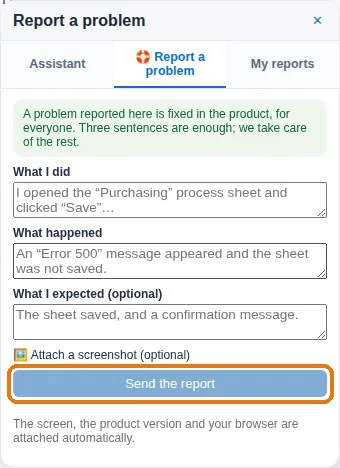
The shortest way: the 📎 button at the bottom right of every screen,
“Report a problem” tab. Three fields, an optional screenshot, and a
number (KC-0042) given right away; the screen, the product version
and your browser are attached automatically. You are notified by email at each
status change, and the “My reports” tab follows it. A problem reported
this way is fixed in the product, for everyone.
Three things make a report answerable on the first reply:
- What you were doing — the screen, and what you clicked.
- What you expected, and what happened instead.
- When — roughly, with your time zone. It lets us find the exact moment in the logs.
A screenshot is worth a paragraph. If an error message appeared, its exact wording matters more than a description of it.
Asking for something that does not exist yet
Say what you are trying to achieve rather than the feature you imagine. Half the time there is already a way; the other half, the description of the goal produces a better feature than the description of the solution.
See also: KnowledgeCapital: frequently asked questions · Your first hour: a first real diagnosis · Free 14-day trial and pricing · Knowledge management software: how to choose
Frequently asked questions
How quickly do you answer?
Every message gets an acknowledgement, then an answer within one business day.
How do I follow a reported problem?
The report gets a number, for example KC-0042. You are notified by email at each status change, and the “My reports” tab shows its progress.
What should a report include?
What you were doing, what you expected and what happened instead, the approximate time with your time zone, and a screenshot. The screen, the product version and the browser are attached automatically.