Step 9 — Tests: locations, questions, a first campaign
Declare the test locations, build the question bank and launch a first test campaign, targeted by the system from the knowledge map.
In short. A declared mastery level is an opinion; a tested one is a measurement. You declare the test locations, you build the question bank — generated from the knowledge base or written by hand, but always validated by a human — then you launch a first campaign: the system lists who to summon, and why.
A declared mastery level is an opinion; a tested mastery level is a measurement. Tests turn the one into the other. Three preparations, then the campaign. (How targeting works is explained in detail in Targeting and creating tests.)
1. Test locations
1
Administration › Test campaigns, Test locations block.
2
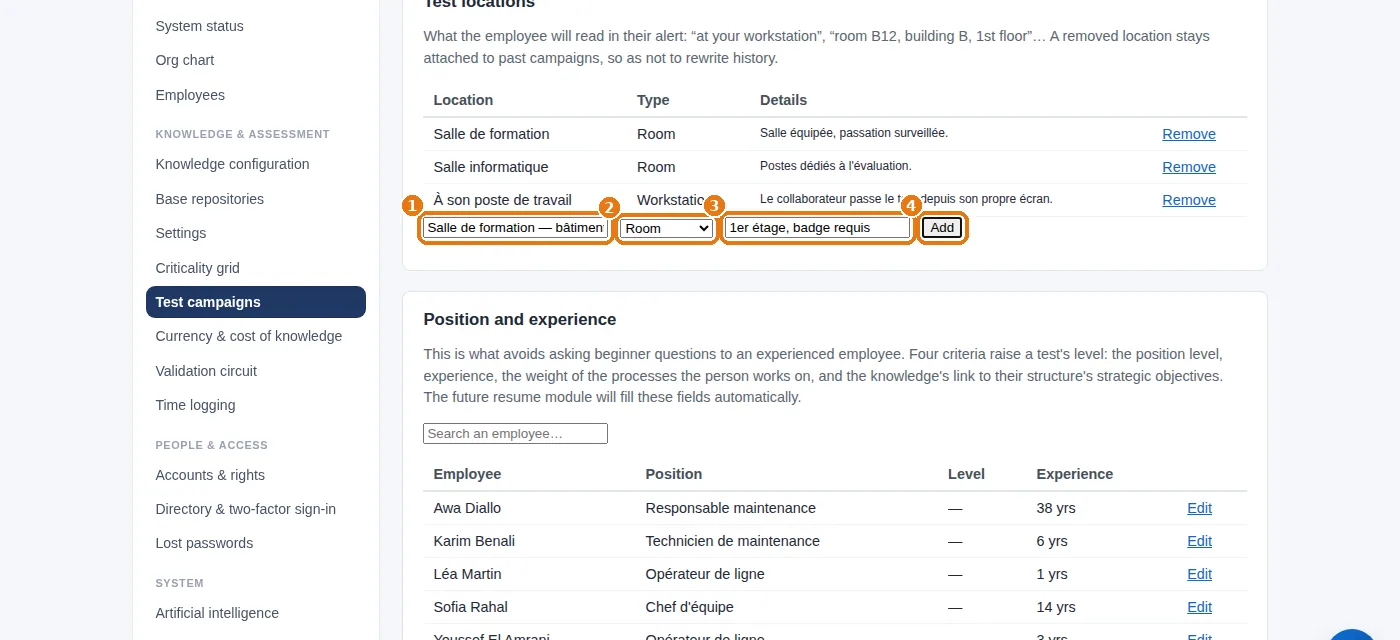
1 The name of the location, 2 its type (workstation, room, site), 3 any useful details (building, floor, access), then 4Add.
Test locations: the name of the location, its type, the details, then “Add”.
This is what the employee will read on their summons. On the same page, Position and experience sets each person's position level and experience: this is what prevents beginner questions from being put to an experienced person.
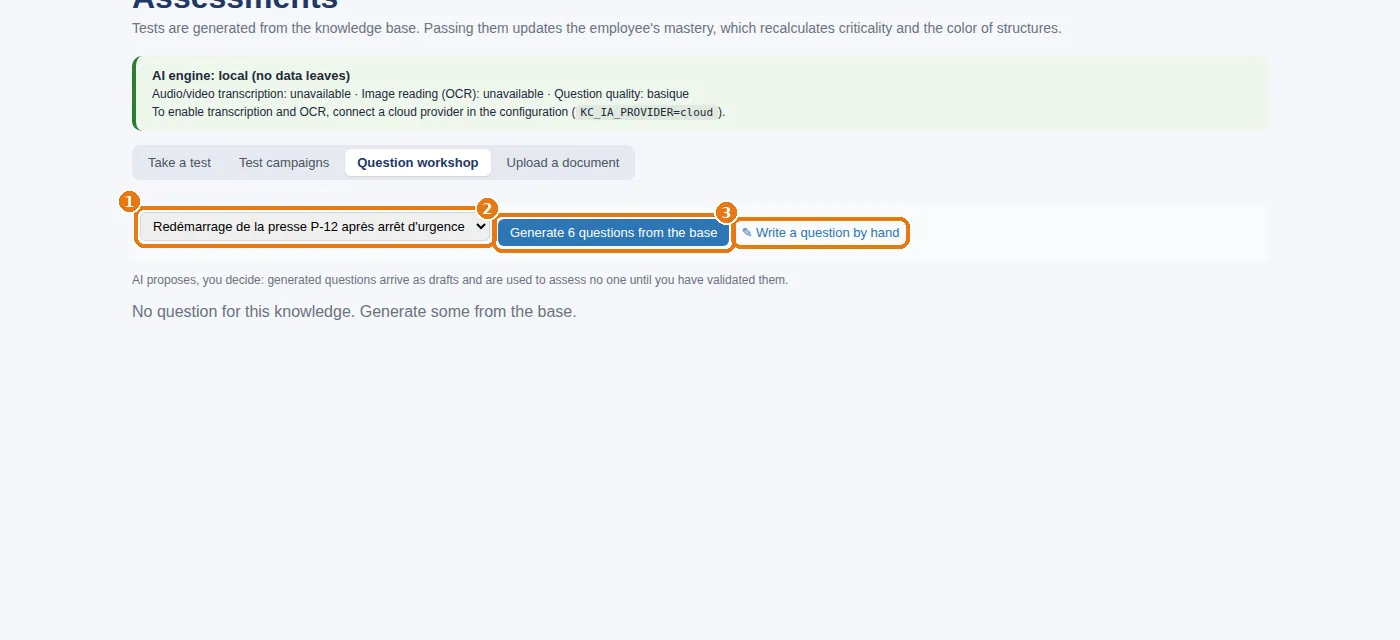
2Generate 6 questions from the base: the local engine drafts six questions from what the knowledge base already holds on this subject (validated entries, linked documents). Or 3 write one yourself.
The question workshop: choose the knowledge item, generate six questions or write one.
3
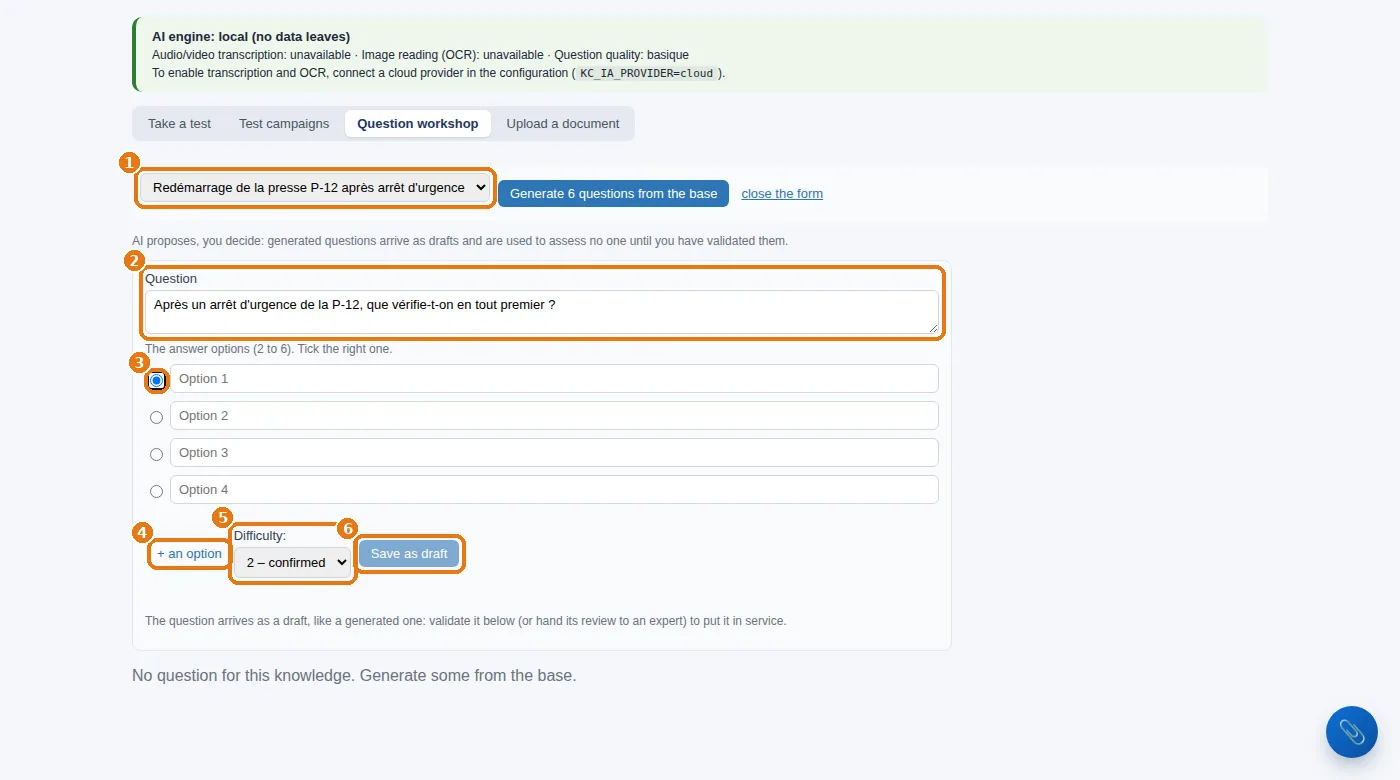
To write a question: 2 the question text, as the employee will read it; 3 the answer options — tick the circle of the correct answer; 4 one more option if needed; 5 the difficulty (beginner, confirmed, expert); then 6Save as draft.
Writing a question by hand: the question text, the options and the correct answer, the difficulty, then saving as a draft.
A question starts life as a draft. Whether generated or written, it is not used to test anyone until a human has validated it in the workshop. Have the questions reviewed by the knowledge holder: they are the one who knows whether the right answer really is right. The system status counts the “validated assessment questions”.
3. A first campaign
1
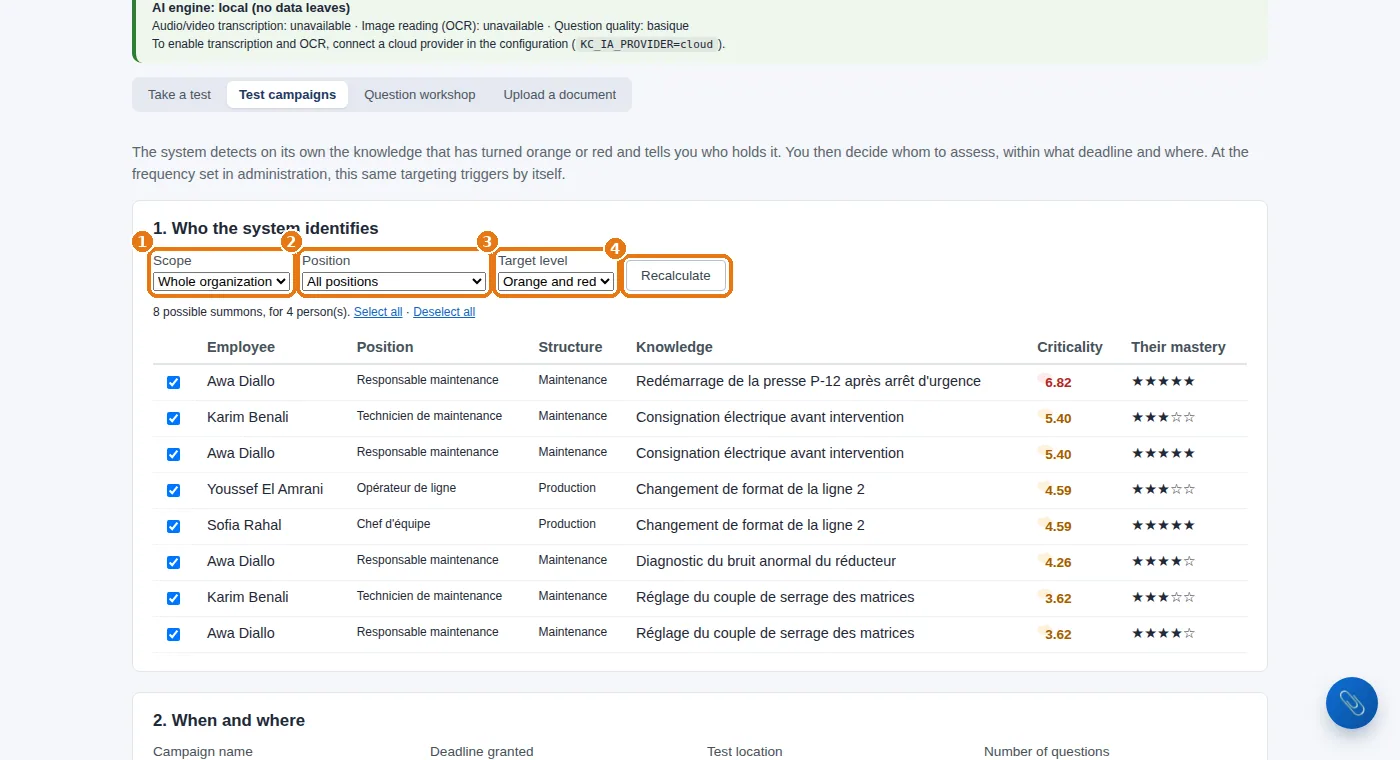
Same screen, Test campaigns tab. Section 1. Who the system identifies: 1 the scope, 2 the position (or all positions), 3 the target level (orange and red, red only…), then 4Recalculate. The system lists the people to summon and why: each line gives the knowledge item, its criticality and the current mastery level.
Campaign, part 1: the scope, the position, the target level, then “Recalculate”.
2
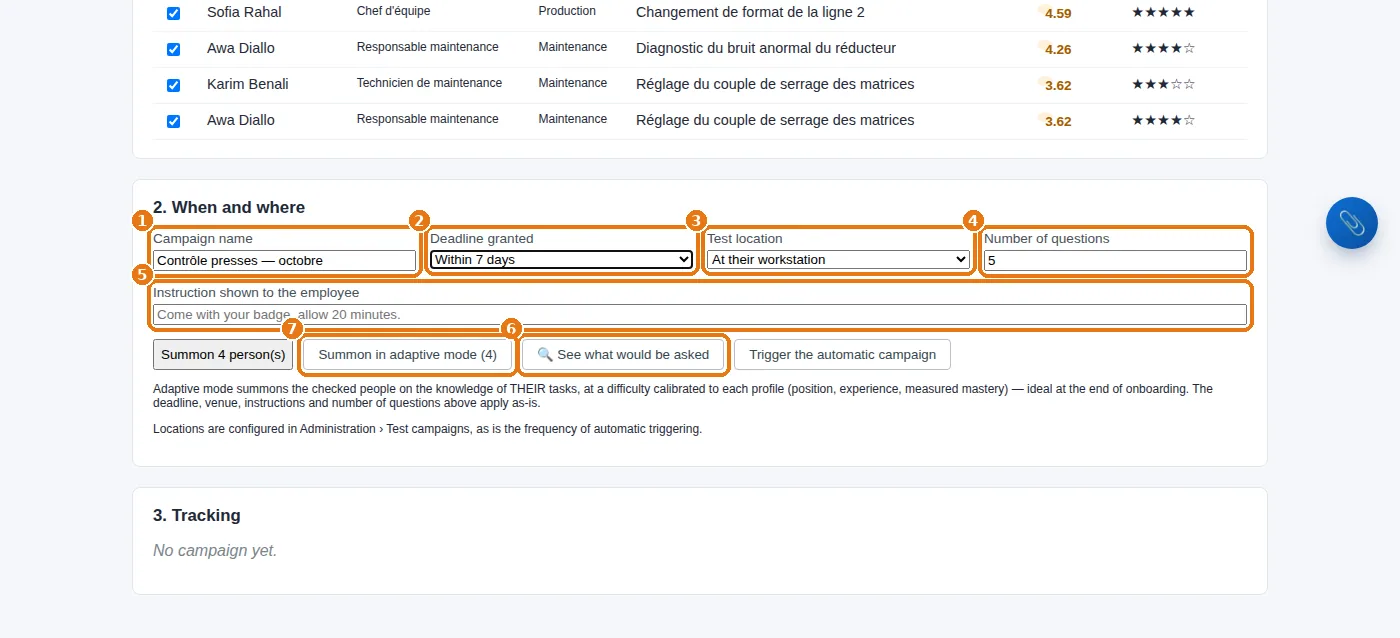
Section 2. When and where: 1 the name of the campaign, 2 the time allowed, 3 the test location, 4 the number of questions, 5 the instructions shown to the employee.
3
6 Click See what would be asked and tick a person to see exactly what would be put to them (expected level, target difficulty, questions ready). Then summon — 7 preferably in adaptive mode: each person is tested on the knowledge of THEIR tasks, at a difficulty calibrated to their profile.
Campaign, part 2: name, deadline, location, number of questions, instructions, preview, adaptive summons.
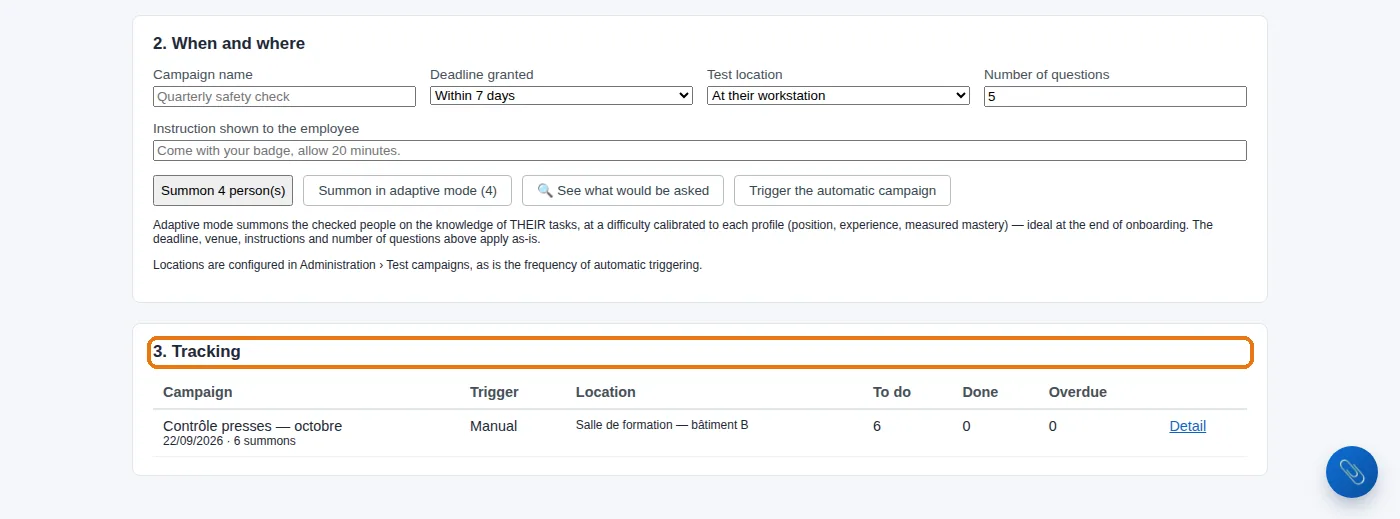
The people summoned see their test in My space; the results update their mastery level, and the map moves by itself. The 3. Tracking section shows who has taken the test, who is overdue, and the scores.
Campaign, part 3: tracking what has been launched.
Then, automatically.Settings › “Test campaigns”: the number of days between two campaigns and the switch for automatic triggering. The system then relaunches tests by itself on whatever turns orange.
Measure, instead of assuming.The system chooses who to test from the map, calibrates the difficulty to each person's profile, and updates the measured mastery level from the very first result. Try it on one team: 14 days, no card. Start a free 14-day trial (no card needed) or request a demo.
Knowledge then Assessments, Question workshop tab: choose the knowledge item, then click “Generate 6 questions from the base”, or write the question, the answer options and the difficulty yourself.
Can generated questions be used straight away?
No: generated or written, a question starts life as a draft and tests nobody until a human has validated it in the workshop. Have the questions reviewed by the knowledge holder.
How do you launch a first test campaign?
In the Test campaigns tab, choose the scope, the position and the target level, then click Recalculate: the system lists the people to summon, and why. Then set the name, the time allowed, the location and the number of questions, and summon, preferably in adaptive mode.